How to Create a Stunning Online Restaurant Menu (Step-by-Step Guide)
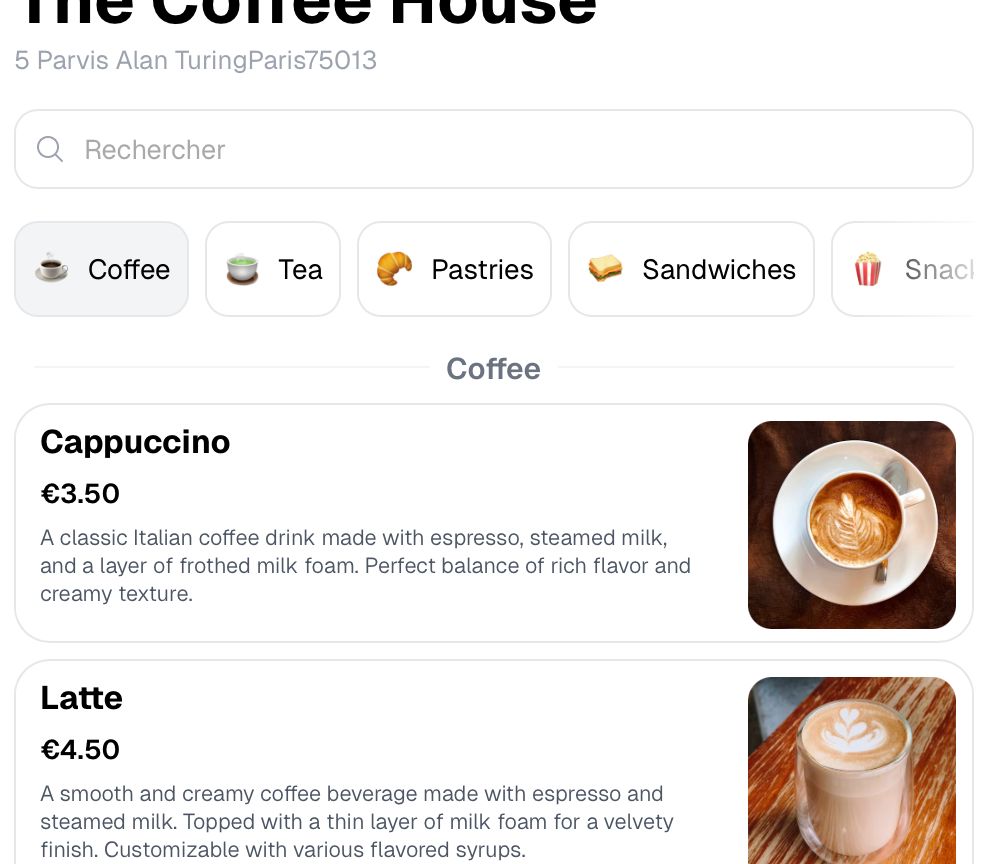
Creating an online restaurant menu takes four steps: choose a menu maker, start from a template, add photos and descriptions, then publish to a permanent link you can share and update. Most restaurants get a first version live the same day.
In today’s digital age, having an online restaurant menu is crucial for boosting your restaurant’s online presence and driving more customers to your door. This guide will show you how to design, edit, and publish a professional digital restaurant menu using modern tools and SEO best practices.
Step 1 – Choose the Right Restaurant Menu Maker
Instead of relying on outdated PDFs, select a modern restaurant menu design tool that offers features such as:
- Real-time updates: Quickly edit and update your menu as needed.
- High-quality visuals: Easily add images to enhance your customer experience.
- Sharable links: Generate a permanent URL that works seamlessly on your website and social media.
Top Online Menu Makers:
- HeyMenus.com: A user-friendly, drag-and-drop menu editor ideal for restaurants. See how it stacks up against Menubly and MenuTiger.
- Canva: Offers basic menu design capabilities with free, customizable templates.
- Adobe Express: Provides professional templates, though it may be more complex for beginners.
💡 Pro Tip: Choose a menu tool that supports real-time updates and allows you to create a custom permalink. This ensures you won’t need to change your website link every time you update your prices or dishes.
Step 2 – Design Your Menu with Professional Templates
The design of your online restaurant menu is key to enhancing your customer’s dining experience. Follow these design tips:
- ✅ Readable Fonts: Use simple fonts that are easy to read—avoid overly fancy scripts.
- ✅ Clear Organization: Categorize items (Appetizers, Main Dishes, Drinks) for a smooth user experience.
- ✅ Highlight Best-Sellers: Use icons or dedicated sections to showcase your top dishes.
💡 Pro Tip: Keep your design simple and mobile-friendly. With over 70% of users accessing menus on their phones, responsive design is essential.
Step 3 – Add High-Quality Images and Descriptions
High-quality visuals can significantly influence customer decisions. Enhance your menu with:
- 📸 Stunning Food Images: Use clear, high-resolution photos that make your dishes look irresistible.
- Engaging Descriptions: Keep descriptions short and enticing (e.g., “Juicy, flame-grilled steak with rosemary butter”).
- Focused Selection: Limit the number of images to your best dishes to avoid overwhelming your visitors.
🚫 Avoid: Overloading your menu with too many images. Quality over quantity is key for a streamlined look.
Step 4 – Publish & Share Your Digital Menu
Once your online restaurant menu is ready, it’s time to publish and share it across multiple channels:
- ✅ Website Integration: Embed the menu on your restaurant website.
- ✅ Local Listings: Share it on platforms like Google My Business to improve local SEO.
- ✅ Social Media: Post the menu on Facebook, Instagram, and Twitter for wider reach.
- ✅ QR Codes: Generate a QR code for tables so customers can access your digital menu instantly. The QR code menu guide covers sizing, printing and testing it.
📢 Bonus Tip: Optimize your menu with SEO keywords to help it rank higher on Google. This will drive more organic traffic to your site and attract hungry customers searching for an online restaurant menu.
Start Creating Your Online Restaurant Menu Today!
A professionally designed digital menu not only boosts orders and improves customer experience but also enhances your restaurant’s visibility on search engines.
🚀 Try HeyMenus today and transform your traditional menu into an eye-catching, interactive online restaurant menu in minutes!
Happy menu designing!
Frequently asked questions
Can I update my menu in real time?
Yes. With a tool like HeyMenus you can edit your menu any time, and it updates instantly everywhere you have shared the link.
How can I make my menu mobile-friendly?
Use a responsive menu tool that adjusts to any screen size. Avoid PDFs, which are not optimised for mobile viewing.
What is the ideal size for menu images?
Aim for images around 800x600 px. That size balances image quality against fast loading on a phone.